HubSpot Marketing Hub vs Sales Hub: The Ultimate 2026 Internal Suite Audit
The ultimate internal suite audit: which Hub should own demand, pipeline, and revenue operations?
| IMPORTANT 2026 PRICING AND PACKAGING NOTE |
| HubSpot pricing, seat rules, credits, marketing-contact tiers, onboarding fees, and promotional discounts can change. As reviewed August 2, 2026, Marketing Hub and Sales Hub both offer Free, Starter, Professional, and Enterprise editions, but their billing logic is different. Marketing Hub cost is heavily influenced by marketing-contact volume, while Sales Hub is primarily seat-driven. Verify HubSpot’s live pricing and product catalog before purchase. |
The 30-Second Verdict
| Choose Marketing Hub when… | Choose Sales Hub when… |
| • Your priority is demand generation • You run email, forms, ads, campaigns, and nurture • You need lead scoring and marketing attribution • You manage marketing contacts and lifecycle conversion | • Your priority is pipeline execution • Reps need sequences, meetings, tasks, and deal tools • You need forecasting, coaching, and sales analytics • You want faster follow-up and cleaner opportunity management |
| STACKCOMPARE WINNER |
| Best standalone Hub for generating and nurturing demand: Marketing Hub. Best standalone Hub for converting qualified opportunities into revenue: Sales Hub. Best overall operating model for a growing B2B company: use both on the same Smart CRM, with explicit ownership rules for lifecycle stages, lead handoff, pipeline updates, and reporting. |
At-a-Glance Comparison
| Category | Marketing Hub | Sales Hub | Edge |
| Primary mission | Attract, capture, nurture, and measure demand | Prospect, manage opportunities, forecast, and close | Different jobs |
| Marketing email, segmentation, testing, nurture | One-to-one email, templates, tracking, sequences | Marketing / Sales by use case | |
| Automation | Campaign and lifecycle workflows | Lead rotation, outreach, task, and deal workflows | Tie by function |
| Lead management | Forms, lists, scoring, campaign engagement | Prospecting workspace, lead queues, activities | Tie |
| Pipeline management | Lifecycle visibility and attribution | Deals, stages, forecasting, next actions | Sales Hub |
| Reporting | Campaign, channel, funnel, attribution | Rep activity, pipeline, forecast, revenue | Tie |
| AI emphasis | Content, personalization, campaign execution | Prospecting, guided selling, deal progression | Tie |
| Primary cost driver | Edition, seats, marketing contacts, credits | Edition, paid sales seats, credits | Depends |
| Best for | Marketing and demand-generation teams | Sales, SDR, AE, and revenue teams | Depends |
Visual Scorecard
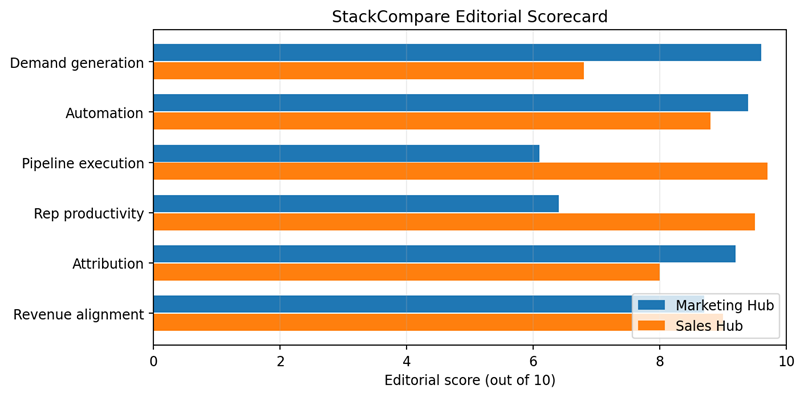
Editorial scores summarize the qualitative buyer criteria in this guide. They are not laboratory benchmarks and should not be treated as permanent product rankings.
Executive Summary
Marketing Hub and Sales Hub are not true substitutes. They are neighboring operating systems inside HubSpot’s customer platform. Marketing Hub is designed to create and develop demand: forms, marketing email, audience segmentation, campaign orchestration, personalization, lead scoring, automation, and attribution. Sales Hub is designed to convert demand into booked revenue: prospecting, one-to-one outreach, meeting scheduling, lead and deal workspaces, pipeline management, guided selling, forecasting, conversation intelligence, and sales reporting.
The strategic question is therefore not simply “Which Hub is better?” It is “Where does marketing ownership end, where does sales ownership begin, and how should the shared CRM connect the two?” A company can buy both products and still create a poor revenue system if lifecycle stages are vague, lead qualification is inconsistent, duplicate automations compete, or salespeople do not trust marketing data.
Marketing Hub produces the most value when a business has repeatable acquisition channels, enough audience volume to justify segmentation, and a clear plan for converting anonymous visitors into known contacts and qualified demand. Sales Hub produces the most value when a team has multiple sellers, a defined pipeline, measurable conversion stages, and a need for consistent follow-up, forecasting, coaching, and opportunity control.
For most B2B organizations with dedicated marketing and sales teams, the strongest architecture is both Hubs on one Smart CRM. Marketing Hub should own campaign engagement, marketing consent, segmentation, nurture, and pre-sales qualification. Sales Hub should own active prospecting, opportunity stages, next steps, commercial activity, and forecast. Shared definitions—especially lifecycle stage, lead status, qualified lead, sales acceptance, and closed-loop attribution—matter more than the software purchase itself.
Sources checked August 2, 2026: HubSpot Marketing Hub product and pricing pages; HubSpot Sales Hub product and pricing pages; HubSpot Product & Services Catalog; HubSpot feature documentation for marketing studio, sales automation, deal pipelines, smart deal progression, forecasting, and lead management.
1. Core Purpose and Operating Model
Marketing Hub: create and develop demand
Marketing Hub is the demand-generation side of the platform. It helps a team capture leads through forms and landing experiences, send and optimize marketing email, build segments and lists, orchestrate campaigns, automate nurture, personalize experiences, manage ads and social activity, and connect marketing engagement to CRM records. Its central question is: who should we attract, what message should they receive, and how do we know whether marketing influenced revenue?
- Use it to convert anonymous traffic into known contacts.
- Use segmentation and lifecycle data to deliver relevant campaigns.
- Use workflows to nurture, qualify, route, and suppress contacts.
- Use campaign and attribution reporting to connect activity with pipeline and revenue.
| BEST USE |
| Marketing Hub is strongest when marketing owns a measurable funnel—from audience acquisition through qualified handoff—and has enough volume to benefit from segmentation, automation, and attribution. |
Sales Hub: convert demand into revenue
Sales Hub is the pipeline-execution side of the platform. It gives sellers a workspace for leads, activities, deals, meetings, outreach, tasks, documents, forecasts, and coaching. It is designed to reduce administrative work, increase follow-up consistency, surface the best next action, and give managers a reliable view of pipeline health.
- Use sequences and templates for structured one-to-one outreach.
- Use meeting scheduling, email tracking, tasks, and queues to reduce friction.
- Use deal pipelines, stage rules, approvals, and forecasting to control execution.
- Use conversation intelligence, playbooks, and guided selling to improve rep consistency.
2. Lead Capture, Qualification, and Handoff
The most important integration point between the two Hubs is the handoff from marketing-owned demand to sales-owned pursuit. Marketing Hub can capture form submissions, page behavior, email engagement, ad interactions, campaign membership, and scoring signals. Sales Hub can then place accepted leads into prospecting queues, assign owners, trigger tasks, enroll appropriate outreach, and convert genuine opportunities into deals.
| Stage | Primary owner | System behavior |
| Anonymous visitor | Marketing | Track consented engagement and source context. |
| Known contact | Marketing | Segment, nurture, score, and maintain marketing-contact status. |
| Marketing-qualified lead | Marketing with sales agreement | Meet documented fit and engagement criteria; route with context. |
| Sales-accepted lead | Sales | Confirm ownership, disposition, next action, and response-time expectation. |
| Sales-qualified opportunity | Sales | Create or associate a deal, value, stage, close date, and stakeholders. |
| Closed won/lost | Sales + RevOps | Complete outcome data so marketing can measure quality and attribution. |
| HANDOFF RULE |
| Never use a single score as the entire handoff policy. Combine fit, intent, engagement, timing, exclusion rules, owner capacity, and a measurable service-level agreement. Sales must return disposition data so marketing can improve targeting and nurture. |
3. Automation and AI
Both Hubs automate work, but the automation targets are different. Marketing Hub workflows are generally audience- and lifecycle-oriented: nurture contacts, branch by properties or behavior, update records, manage marketing status, create tasks, route leads, or trigger communications. Sales Hub automation is execution-oriented: rotate leads, create follow-up tasks, enroll prospects in structured outreach, update deals, guide next actions, and reduce post-meeting administration.
HubSpot’s 2026 product pages emphasize AI throughout both products. Marketing Hub highlights AI-assisted campaign creation, personalization, email writing, content optimization, and marketing execution. Sales Hub highlights prospecting intelligence, guided selling, meeting preparation and follow-up, forecasting, and smart deal progression. Smart deal progression can analyze conversation transcripts and suggest CRM updates, follow-up emails, tasks, and next steps, subject to rep review.
- Automate stable, documented processes—not unresolved organizational disagreements.
- Require human review for AI-generated external messages, scoring logic, forecasts, and deal updates.
- Create naming conventions, owners, test records, enrollment controls, and rollback procedures for workflows.
- Audit overlapping workflows whenever both Hubs can update the same property or trigger the same action.
| AI GOVERNANCE RULE |
| Treat AI suggestions as editable operational assistance, not authoritative truth. Reps and marketers should review generated content, CRM updates, prioritization, and next steps before those outputs affect customers or forecasts. |
4. Email, Campaigns, and Prospecting
Marketing Hub email is designed for permission-based, one-to-many or segmented communication at scale. Typical uses include newsletters, nurture streams, event promotion, product announcements, re-engagement, onboarding, and campaign follow-up. The surrounding tools—lists, forms, consent, suppression, testing, personalization, and reporting—are as important as the email editor itself.
Sales Hub email tools are designed for personal selling. Reps use templates, tracking, snippets, sequences, tasks, and meeting links to communicate with individual prospects. A sequence can standardize follow-up while still operating as sales outreach rather than a mass marketing campaign.
| Use case | Correct Hub | Reason |
| Monthly newsletter | Marketing Hub | Subscription management, segmentation, and campaign reporting. |
| Automated post-webinar nurture | Marketing Hub | Behavioral branching and lifecycle automation. |
| SDR follow-up to a target account | Sales Hub | Personal outreach, tasks, sequences, and activity tracking. |
| AE sends proposal follow-up | Sales Hub | Deal context, templates, tracking, and next-action management. |
| Re-engage dormant opted-in contacts | Marketing Hub | Audience rules, suppression, consent, and scaled testing. |
| Book a discovery call | Sales Hub | Meeting scheduler and rep-owned follow-up. |
5. Reporting, Attribution, and Forecasting
Marketing Hub reporting answers questions about acquisition and influence: which campaigns generated contacts, which channels produced qualified demand, how audiences progressed through the funnel, and what marketing activity is associated with pipeline or revenue. Higher tiers add more sophisticated automation, reporting, attribution, and governance capabilities.
Sales Hub reporting answers execution questions: how much pipeline exists, where deals are stuck, which reps and activities correlate with progress, what is likely to close, and how reliable the forecast is. Forecasting becomes useful only when deal amount, close date, stage, probability, next step, and ownership are maintained consistently.
- Define one source-of-truth dashboard for executives.
- Separate sourced revenue, influenced revenue, and sales-created pipeline.
- Measure stage conversion, velocity, response time, and loss reasons—not just activity counts.
- Do not allow marketing and sales to publish conflicting definitions of pipeline or revenue.
| REPORTING STANDARD |
| A dashboard is trustworthy only when the underlying lifecycle and deal data are maintained. Fix property definitions and operating discipline before adding more reports. |
6. Data, Governance, and Revenue Operations
Using both Hubs creates a shared customer record, but shared software does not automatically create shared governance. Revenue operations should define property ownership, lifecycle transitions, contact-status rules, deduplication, required deal fields, permissions, naming conventions, workflow documentation, and reporting standards.
| Control | Recommended owner | Audit question |
| Lifecycle stages | RevOps | Are transitions defined, automated carefully, and reversible? |
| Marketing contact status | Marketing Ops + Finance | Who is billable, suppressed, or eligible for campaigns? |
| Lead status and disposition | Sales Ops | Can every routed lead be accepted, recycled, disqualified, or converted? |
| Deal stages and required fields | Sales leadership + RevOps | Does each stage have objective entry and exit criteria? |
| Consent and subscriptions | Marketing Ops / Legal | Are lawful basis, preferences, and suppression rules respected? |
| Reporting definitions | RevOps + Finance | Do dashboards reconcile with financial reporting? |
7. Pricing and Total Cost
Marketing Hub and Sales Hub use different economic models. Marketing Hub pricing is affected by edition, Core Seats, HubSpot Credits, marketing-contact tiers, and—in Professional or Enterprise—onboarding and scale requirements. HubSpot’s official pricing pages reviewed August 2, 2026 listed Marketing Hub Professional starting at $890 per month with three Core Seats and 2,000 marketing contacts, and Enterprise starting at $3,600 per month with five Core Seats and 10,000 marketing contacts; required onboarding fees were also listed for higher editions.
Sales Hub is more directly seat-driven. HubSpot’s Sales Hub product page reviewed August 2, 2026 listed Free, Starter, Professional, and Enterprise editions, with promotional Starter pricing and standard Professional and Enterprise per-seat starting prices. The separate sales pricing page also promoted bundled Revenue Hub pricing for eligible new customers. Because packaging and promotions change, buyers should request a written quote that identifies edition, seat type, minimum commitments, credits, onboarding, add-ons, and renewal assumptions.
| Cost item | Marketing Hub impact | Sales Hub impact |
| Core / paid seats | Included and additional seats vary by edition | Primary scaling factor for sellers and managers |
| Marketing contacts | Major recurring cost driver | Usually indirect unless shared marketing use is added |
| HubSpot Credits | AI and usage-dependent capacity | AI and usage-dependent capacity |
| Onboarding | Required on some higher editions | May apply depending on package and purchase |
| Implementation services | Campaign architecture, migration, tracking, consent | Pipeline design, migration, enablement, forecasting |
| Ongoing administration | Lists, workflows, attribution, database hygiene | Sequences, pipelines, permissions, coaching, data quality |
| BUYING TIP |
| Model total cost over 24 months. Include contact growth, new hires, additional seats, onboarding, migration, integrations, data cleanup, admin time, and renewal pricing—not only the promotional first-year subscription. |
8. Best Hub by Team Type
| Team or situation | Recommended starting point | Reason |
| Founder-led company with no dedicated marketer | Free/Starter tools, then Sales Hub if pipeline is the bottleneck | Keep the system simple and prioritize active revenue work. |
| Inbound marketing team | Marketing Hub | Campaigns, forms, segmentation, nurture, and attribution. |
| Outbound SDR organization | Sales Hub | Prospecting workspace, sequences, tasks, meetings, and lead management. |
| B2B company with marketing and sales departments | Both Hubs | Closed-loop handoff and shared revenue reporting. |
| Long sales cycle / enterprise accounts | Both, with Sales Hub as execution center | Marketing nurtures committees; sales manages stakeholders and opportunities. |
| E-commerce or high-volume lifecycle marketing | Marketing Hub, potentially with other commerce tools | Audience automation and lifecycle communication dominate. |
| Sales team already using another CRM | Pilot Sales Hub carefully | HubSpot says Sales Hub can add productivity alongside another CRM, but integration quality must be proven. |
9. Pros and Cons
| Marketing Hub | Sales Hub |
| PROS • Strong demand-generation toolkit • Sophisticated segmentation and workflows • Campaign, funnel, and attribution visibility • Native connection to CRM and sales data CONS • Marketing-contact growth can raise cost • Advanced value often requires higher tiers • Governance and tracking setup are substantial • Easy to over-automate without clear strategy | PROS • Strong pipeline and rep-productivity workflow • Meetings, sequences, tasks, and deal tools in one place • Forecasting, coaching, and analytics for managers • AI assistance for prospecting and deal progression CONS • Per-seat cost scales with the team • Results depend on disciplined CRM usage • Automation cannot fix a weak sales process • Some advanced capabilities require higher editions |
10. Real-World Scenarios
Scenario A: Inbound SaaS demand engine
Marketing Hub captures demo requests, content downloads, event registrations, and high-intent website behavior. It segments and nurtures contacts until qualification criteria are met. Sales Hub assigns accepted leads, creates tasks, gives SDRs a prospecting queue, and tracks deals through discovery, evaluation, procurement, and close. Both Hubs are justified because the operating model spans acquisition and opportunity execution.
Scenario B: Outbound team with limited marketing
A small SDR and AE team has a clear account list but little campaign volume. Sales Hub is the better first investment. The team gains sequences, meetings, templates, lead management, activity tracking, deal pipelines, and forecasting. Marketing Hub can be added when the company builds scalable inbound, nurture, events, or attribution requirements.
Scenario C: Marketing-heavy company with weak handoff
The company has strong traffic and email performance but sales complains about lead quality. Buying more software will not solve the dispute. First define qualification, exclusions, response time, accepted and rejected dispositions, recycle rules, and reporting. Then configure Marketing Hub to route qualified context and Sales Hub to return outcomes.
Scenario D: Executive demand for one revenue dashboard
Both Hubs can support a shared view, but RevOps must standardize campaign association, lifecycle stages, lead sources, deal creation, stage criteria, amounts, close dates, and loss reasons. The dashboard should reconcile marketing influence, sales pipeline, and finance-confirmed revenue rather than merely combine attractive charts.
11. How to Run the Internal Suite Audit
Before upgrading or expanding the HubSpot stack, run a structured audit using real records, real campaigns, and real opportunities. Score the platform on process fit—not feature count.
| Test | What to measure | Weight |
| Capture and nurture a real lead | Data quality, consent, segmentation, automation accuracy | 20% |
| Route and accept a qualified lead | Speed, ownership, context, disposition discipline | 20% |
| Run a sales opportunity | Stage control, tasks, collaboration, next-step quality | 20% |
| Report a campaign to revenue | Attribution clarity, reconciliation, stakeholder trust | 20% |
| Administer the system for one month | Maintenance time, errors, governance, total cost | 20% |
| AUDIT TIP |
| Use the same definitions, sample records, and success criteria across every test. Record manual correction time, duplicate work, data gaps, and user adoption—not only whether a feature exists. |
12. Frequently Asked Questions
Do Marketing Hub and Sales Hub include the same CRM?
They operate on HubSpot’s shared customer platform and Smart CRM, so marketing and sales can work from connected contact, company, activity, and deal data. Access and advanced capabilities still depend on purchased editions, seats, and permissions.
Can I buy only Marketing Hub?
Yes. It can be used as the primary marketing system, especially when demand generation and lifecycle communication are the main priorities. Sales teams can still use foundational CRM tools, but dedicated Sales Hub capabilities may be needed as pipeline complexity grows.
Can I buy only Sales Hub?
Yes. This is often sensible for outbound-led or founder-led teams that need prospecting, meetings, pipeline, and forecasting more urgently than advanced marketing automation.
Which Hub should own lead scoring?
Marketing Ops usually administers pre-sales fit and engagement scoring, but Sales and RevOps must approve the criteria and continuously return outcome data. Predictive or AI-based scores should be monitored for drift and bias.
Are sequences the same as marketing automation?
No. Sequences support structured one-to-one sales outreach and rep tasks. Marketing workflows and marketing email support permission-based audience automation, segmentation, and lifecycle communication at scale.
Which Hub is more expensive?
It depends on team size, contact volume, edition, seats, credits, onboarding, and add-ons. Marketing Hub can become expensive as marketing-contact volume and sophistication increase. Sales Hub scales mainly with paid users and package level.
Should a small company buy both immediately?
Not automatically. Start with the bottleneck that constrains revenue today. Add the second Hub when the process, team, and volume justify it. Buying both without owners and definitions creates complexity rather than leverage.
Can both Hubs replace a revenue operations strategy?
No. They provide the system, but people must still define ownership, process, governance, service levels, measurement, and accountability.
Final Verdict
| FINAL 2026 VERDICT |
| Marketing Hub wins for demand generation, audience management, lifecycle automation, and marketing measurement. Sales Hub wins for prospecting, rep productivity, pipeline execution, forecasting, and coaching. For a company with separate marketing and sales teams, the real winner is the integrated operating model: both Hubs on one governed CRM, with a documented handoff and one revenue vocabulary. |
For StackCompare readers, the next step is to map the current revenue process before choosing editions. Count active sellers, forecast marketing-contact growth, document lifecycle and pipeline stages, list the automations each team needs, and request a written HubSpot quote. Then run the internal audit in this guide with real work. Choose the package that reduces total operational friction—not the package with the longest feature list.
Related Comparisons
- HubSpot vs Salesforce (2026): Which Is Better?
- Freshsales vs HubSpot (2026): Which Is Better?
- ActiveCampaign vs ConvertKit (2026): Which Is Better?
- Mailchimp vs Klaviyo (2026): Which Is Better?
Editorial Methodology and Sources
StackCompare.ai evaluates software using practical buyer criteria: capability, workflow fit, usability, automation, reporting, governance, implementation burden, pricing structure, and current availability. Editorial ratings summarize these criteria and are not paid placement.
- HubSpot: Marketing Hub product page — https://www.hubspot.com/products/marketing
- HubSpot: Marketing Software Pricing — https://www.hubspot.com/pricing/marketing
- HubSpot: Sales Hub product page — https://www.hubspot.com/products/sales
- HubSpot: Sales Software Pricing — https://www.hubspot.com/pricing/sales
- HubSpot: Product & Services Catalog — https://legal.hubspot.com/hubspot-product-and-services-catalog
- HubSpot: Marketing Studio and Marketing Hub feature pages.
- HubSpot: Sales automation, deal pipeline, smart deal progression, forecasting, and lead-management feature pages.
Last reviewed: August 2, 2026. Product names, packaging, promotions, limits, onboarding requirements, and pricing can change. Verify official HubSpot pages and a written quote before purchasing or publishing time-sensitive pricing.